
TeamProof for Jobber: GPS proof for your Jobber visits
Jobber is where a lot of service companies book work, send quotes and get paid. It's good at that, and we're not asking anyone to leave it. What Jobber doesn't do is prove, with a GPS check-in and before and after photos, that a crew actually stood at the property when the visit was scheduled. That's the one job TeamProof was built for, and the Jobber connection is how the two fit together.
How it fits: TeamProof works alongside Jobber. Keep booking, quoting and billing in Jobber, connect your Jobber account with Jobber's own sign-in, and bring the visits you want into TeamProof for GPS and photo proof.
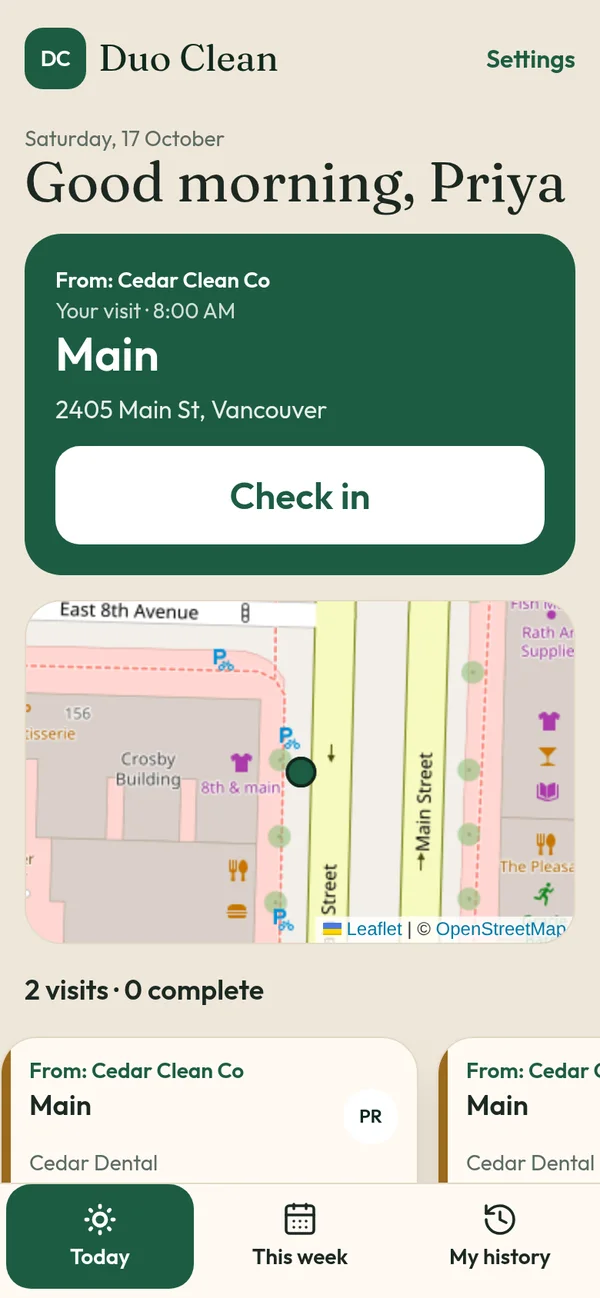
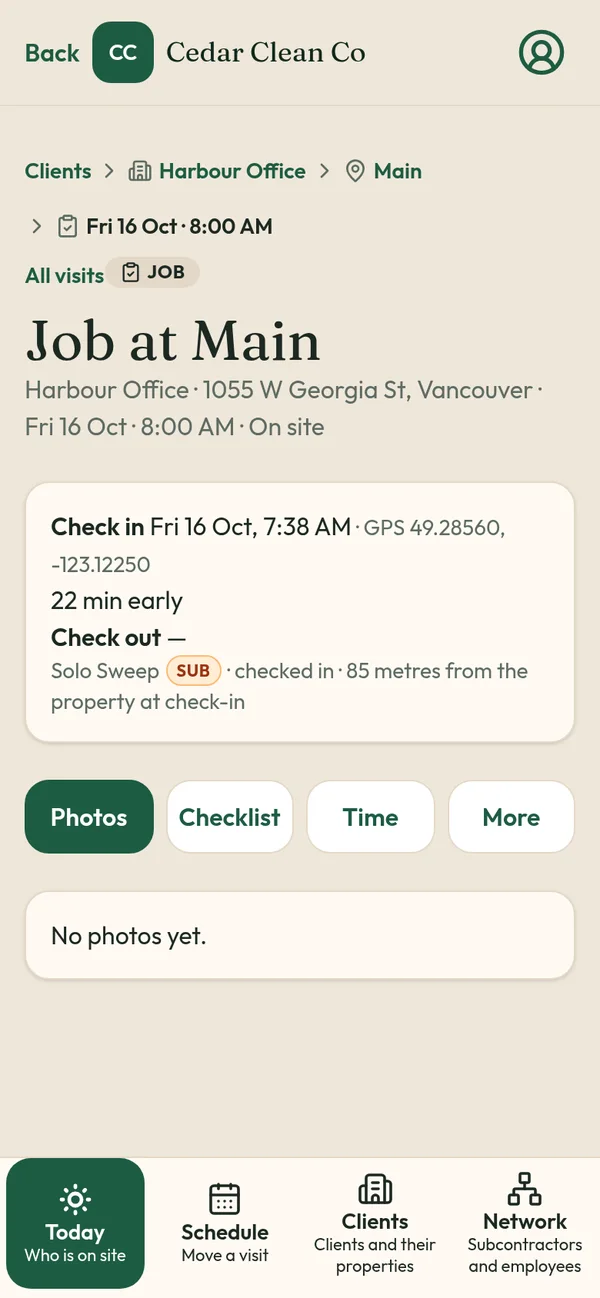
What the connection does today
This is the flow:
- Connect with Jobber's own sign-in. You approve access on Jobber's screen (OAuth). You never give TeamProof your Jobber password.
- Bring in the visits you want. In TeamProof, open Bring in from Jobber. You see your upcoming Jobber visits grouped by client. Tick the ones you want, choose who they're assigned to, and bring them in. You can also turn on auto-import for a client, so their new visits come over without picking them each time. New Jobber visits are flagged so nothing slips past you.
- Crews check in and out in TeamProof. GPS is checked against the site pin at check-in and check-out only. Before and after photos and the checklist are saved to the visit.
What TeamProof brings in, and what it leaves alone
TeamProof pulls the clients, properties, visits and team members it needs to set up your visits. It doesn't pull your quotes or invoices; pricing and billing stay in Jobber.
You can disconnect at any time from TeamProof's Jobber settings, and TeamProof tells Jobber the app was disconnected.
Why add proof to Jobber at all
If you run recurring work, the dispute you dread isn't about the invoice. It's the email at 8:30 in the morning that says "nobody came last night." A completed status in a scheduling tool says the visit was closed. It doesn't show where the phone was when someone tapped the button, or what the washroom looked like afterwards.
TeamProof adds three things Jobber doesn't focus on:
- GPS at the site pin. The check-in counts against the location you pinned for that property. (How GPS check-in works)
- Missed-visit alerts. One hour after a scheduled start with no check-in, the visit gets a Missed tag and you get an email, so you can reassign it before the client notices. (Missed visit alerts)
- A private client link. Property managers can open their visits and see times, GPS and photos, without ever seeing your workers' names, phone numbers or pay. (Client visit report link)
Who this is for
The connection makes the most sense for companies that already run their scheduling in Jobber and send crews, or subcontractors, to sites they can't inspect themselves: commercial and office cleaning, mobile patrol, snow removal and recurring property work. TeamProof was built inside Sweepy Maids, a cleaning company in Metro Vancouver, to solve exactly this for night commercial cleans.
If you're comparing tools rather than connecting them, read TeamProof vs Jobber or our broader Jobber alternative guide.
What it costs
TeamProof is one plan (see current pricing), with unlimited workers. Subcontractors join free. The first 30 days are free and you don't need a card to start. Your Jobber subscription is separate and stays with Jobber. See pricing.
Using TeamProof with Jobber today
Sign up, connect Jobber from TeamProof's settings, and open Bring in from Jobber to pick the visits you want proof on. You can also set up sites, crews and schedules directly in TeamProof. Either way your crews check in on their phones and you get the same GPS, photos and Missed alerts. TeamProof doesn't post proof back into Jobber; the proof lives in TeamProof and in the private client report link.
Start your 30-day free trial · No card needed
Frequently asked questions
Is TeamProof an official Jobber partner?
No. TeamProof works alongside Jobber: you connect with Jobber's own sign-in and bring in the visits you choose. It isn't an official Jobber partner or product.
Does TeamProof replace Jobber?
No. Jobber stays where you book, quote and invoice. TeamProof adds GPS check-in, photos and Missed alerts, and can bring in the Jobber visits you choose.
Can TeamProof see my Jobber quotes or invoices?
TeamProof doesn't pull quotes or invoices. It brings in clients, properties, visits and team members to set up your visits.
What happens if I disconnect?
You can disconnect from TeamProof's Jobber settings at any time, and TeamProof tells Jobber the app was disconnected.
How much does it cost?
One TeamProof plan (see current pricing), with unlimited workers and a 30-day free trial with no card. Jobber is billed separately by Jobber.
More ways to prove every visit
See how all features and simple pricing work for your sites.
- Office cleaning proof
- Commercial cleaning software Vancouver
- Airbnb turnover cleaning
- Mobile patrol app
- Snow plowing documentation
- Landscaping proof of service
- Medical office cleaning
- School cleaning
- Retail store cleaning
- Restaurant cleaning
- Post-construction cleaning
- Window cleaning
- Residential cleaning
- Security guard check-in
- HOA maintenance
- Facility management
- Building maintenance
- HVAC maintenance
- Lawn care
- Property management contractors
- Proof of service app
- Missed visit alerts
- Client visit report link
- Prove employees showed up
- GPS check-in app
- Proof of visit app
- Timestamped photo app
- GPS check-in without tracking
- Verify cleaners cleaned
- Stop no-show employees
- Win janitorial contracts
- Prove a security patrol happened
- Janitorial quality control
- Is GPS tracking employees legal in Canada?