
How to prove employees showed up to a job site
If you send people to sites you don't visit yourself, sooner or later someone will tell you the work didn't happen. Sometimes they're right. Often they're not, and the hard part is proving it. This guide walks through the common methods, what each one actually proves, and the setup we landed on after running night cleaning crews in Metro Vancouver at Sweepy Maids.
Start with what "proof" has to show
When a client disputes a visit, they're usually asking about three things:
- Presence. Was someone physically at this property?
- Timing. When did they arrive and leave?
- Work. What was done, and what did it look like after?
A good method answers all three without relying on anyone's memory. A weak method answers one, or depends on the worker telling you.
Method 1: Paper sign-in sheets
A sheet at the front desk or in the janitor's closet. It's cheap and simple, and some buildings require it. But anyone can sign for anyone, times are whatever someone writes, and you only see the sheet when you physically collect it. It proves very little in a dispute.
Method 2: Text or group-chat check-ins
"At the site" in WhatsApp, maybe with a photo. Better than nothing, and the message has a timestamp. But the location isn't checked, photos can be old, messages get buried in busy chats, and you only find out about a missing message if you go looking. It also shares your workers' personal numbers widely.
Method 3: Time clock apps
A time clock records that the employee was working and for how long. Some add location. It's built for payroll, not for a client: it tells you a person worked six hours, not that the boardroom on the third floor was cleaned. It also usually doesn't know which client visit was supposed to happen when.
Method 4: Photo apps
Photo apps capture what the site looked like, sometimes with a location stamp. That's strong evidence of work. But a photo app doesn't know a visit was scheduled, so it can't tell you when one didn't happen. No photo, no alert.
Method 5: Scheduled visits with GPS check-in and photos
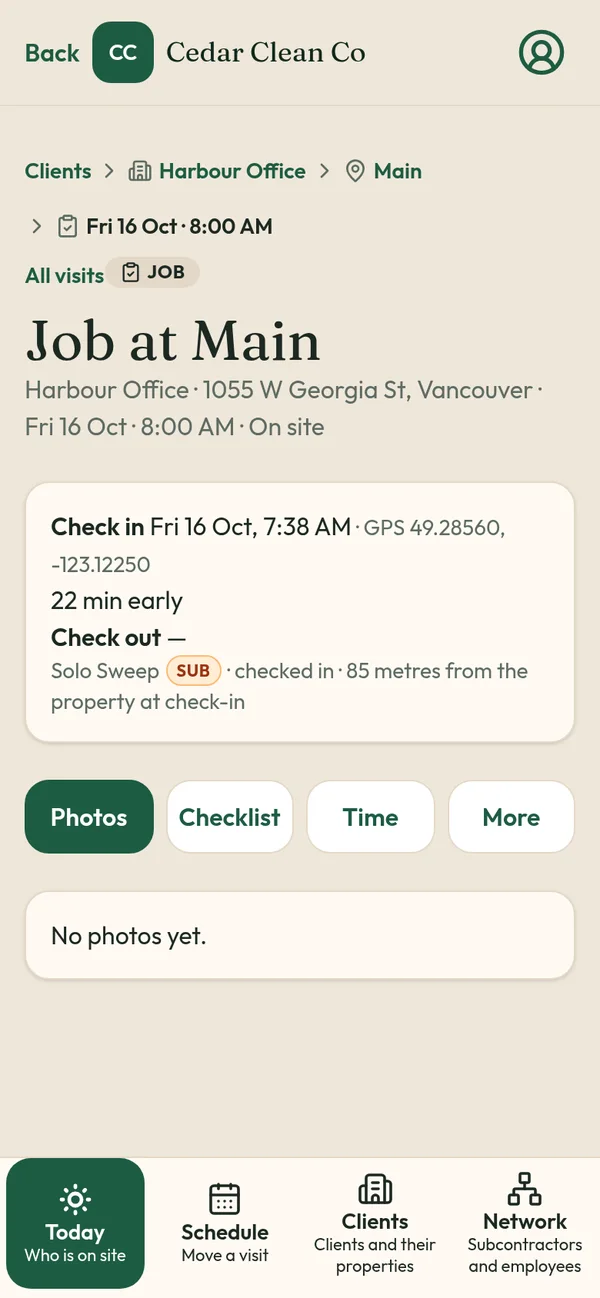
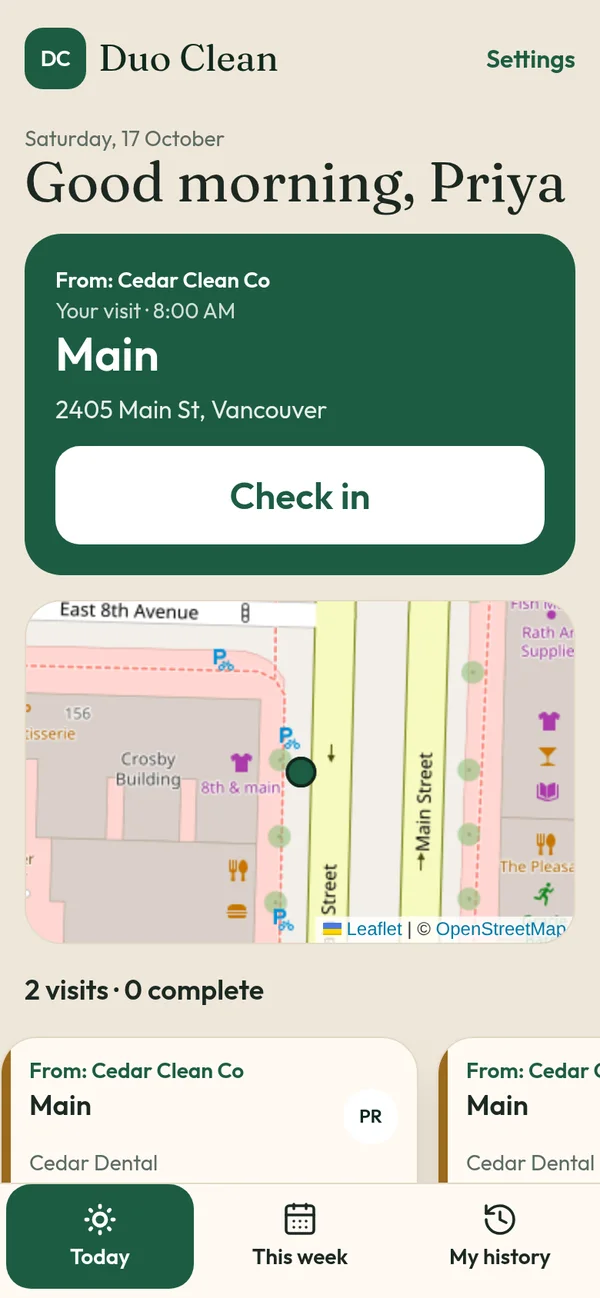
This is the combination that holds up. Each visit is scheduled against a specific property. The worker checks in, and the phone's location is compared with that property's pin. They take before and after photos and work a checklist, then check out the same way. If no check-in arrives, the system raises the alarm.
That's how TeamProof works:
- Check-in and check-out against the site pin. GPS is checked at those two moments only.
- Before and after photos saved to the visit, plus the checklist.
- Late reasons if the worker is more than an hour off the start.
- Missed tag and email one hour after a scheduled start with no check-in. See missed visit alerts.
- A private client link with times, GPS and photos, without worker names or phones. See client visit report link.
Practical tips that make any method stronger
Pin the entrance, not the middle of the lot. For big buildings and campuses, pin where crews actually enter so check-ins match.
Tell crews what to photograph. "Take photos" produces 30 pictures of a hallway. A checklist that names the washroom, entry mats and garbage area produces useful proof. Try our janitorial checklist template or security patrol log template.
Make it easy. Proof fails when the app is hard. TeamProof uses phone and PIN login, one big Check in button and photo steps that move on by themselves, in English, Punjabi or Hindi.
Be upfront with workers. Explain what's recorded and why. Checking location only at check-in and check-out is easier to explain than tracking all shift. See is GPS tracking employees legal in Canada?
Cover your subcontractors too. If a sub does the visit, you still need the proof. TeamProof subs join free and see only their own visits. See subcontractor verification.
Choosing a setup
If you only have a couple of sites and you're on them daily, a sign-in sheet might be enough. Once you have night work, several crews or subs, method 5 is the one that saves you the 8:30 AM argument. More detail by industry: office cleaning, mobile patrol, landscaping and snow plowing.
TeamProof is one plan (see current pricing) with unlimited workers and 30 days free and no card. Start your free trial or read the Sweepy Maids case study.
Frequently asked questions
What's the most reliable way to prove an employee was on site?
A scheduled visit with a GPS check-in and check-out compared against the site's location, plus before and after photos and a checklist.
Are timestamps on texts enough proof?
They help, but texts don't verify location and are easy to miss or dispute.
Do I need to track workers all day to prove attendance?
No. Checking location at check-in and check-out against the site pin proves arrival and departure without tracking the whole shift.
How do I find out about no-shows quickly?
Use a system that knows the schedule. TeamProof tags a visit Missed and emails you one hour after the start if there's no check-in.
More ways to prove every visit
See how all features and simple pricing work for your sites.
- Office cleaning proof
- Commercial cleaning software Vancouver
- Airbnb turnover cleaning
- Mobile patrol app
- Snow plowing documentation
- Landscaping proof of service
- Medical office cleaning
- School cleaning
- Retail store cleaning
- Restaurant cleaning
- Post-construction cleaning
- Window cleaning
- Residential cleaning
- Security guard check-in
- HOA maintenance
- Facility management
- Building maintenance
- HVAC maintenance
- Lawn care