
Jobber alternative: what to use when you need proof, not more paperwork
People search for a Jobber alternative for very different reasons. Some find the plans expensive as the crew grows. Some only use a fraction of the features. And some, usually companies running recurring commercial work, realize the tool they're paying for doesn't answer the one question their clients keep asking: did someone actually show up?
This page is the hub for all of it. It's an honest guide to what Jobber does well, where a proof-of-visit tool like TeamProof fits, and when you should keep Jobber and add TeamProof instead of switching.
What Jobber is genuinely good at
Jobber is a field-service management platform. It's built to run your own team end to end: requests, quotes, scheduling and dispatch, invoices and online payments. If your business is mostly residential one-off jobs, where winning the quote and getting paid fast are the hard parts, that's a strong set of tools. We say so on our own FAQ: Jobber and Housecall Pro are built to run your team, CompanyCam is built for job photos, and TeamProof is built to prove every visit happened.
Where the gap shows up
The gap appears when the work is recurring, often at night, and often done by people you aren't standing next to:
- Night commercial cleaning. The client finds out about a missed clean before you do.
- Subcontracted sites. You need the sub's crew to check in and send photos without seeing your client list or prices.
- Patrols and snow. You need a time and place on record for every stop, sometimes for an insurance claim.
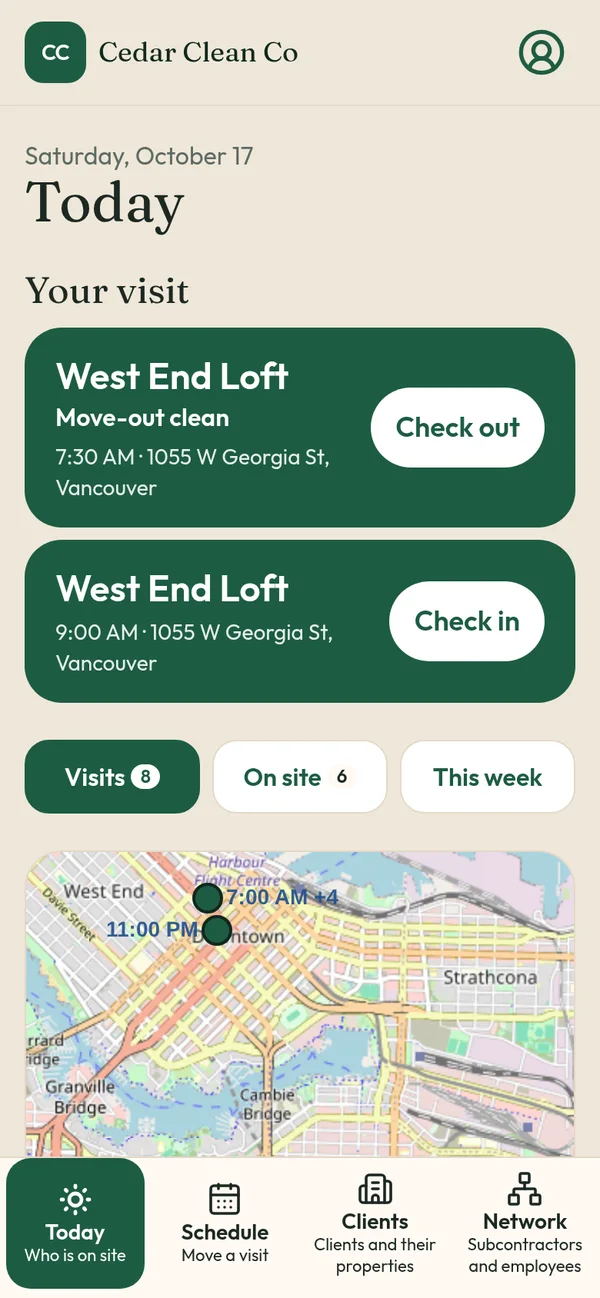
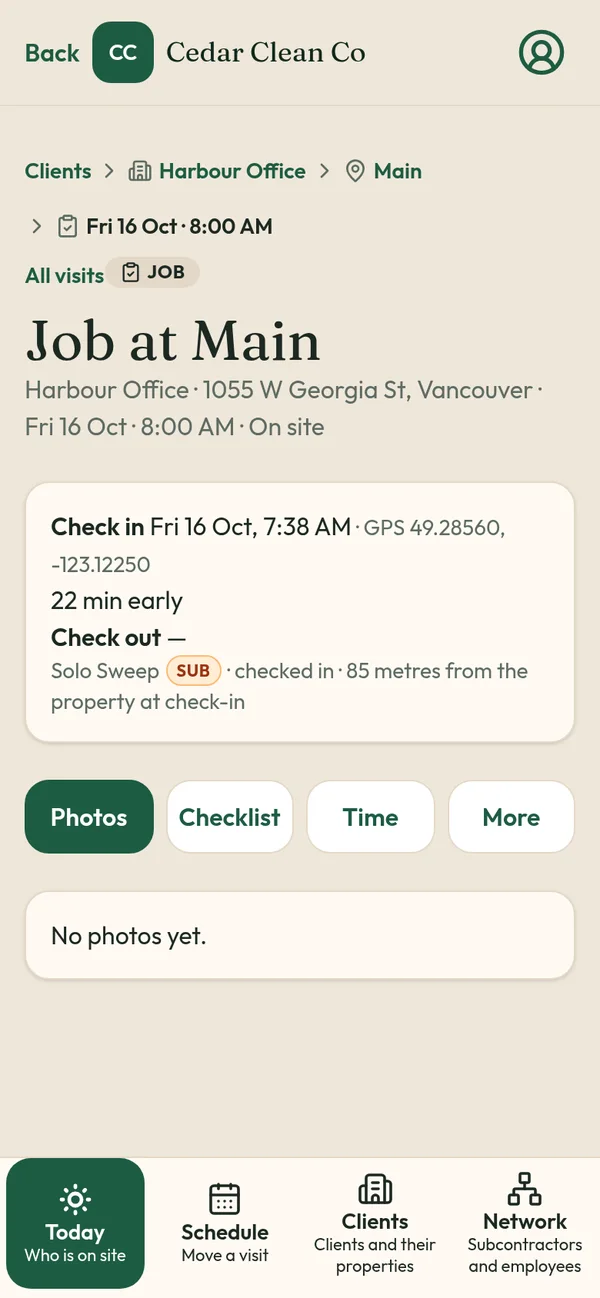
A scheduling app marks a job done. TeamProof records a GPS check-in against the site pin, before and after photos, the checklist and the check-out time, and it raises a Missed tag with an email if nobody checks in within an hour of the start time.
Three ways to read this decision
1. You run commercial cleaning
This is the most common case we see, and it has its own detailed page: Jobber alternative for commercial cleaning. It covers night crews, multi-site routes and property-manager reporting.
2. You want a straight comparison
Read TeamProof vs Jobber for a side-by-side on scheduling, proof, subcontractors, pricing model and what each one leaves out. It also lists the things Jobber does that TeamProof doesn't, like invoicing and payments, which on our side are still marked coming soon.
3. You want to keep Jobber
Plenty of owners don't want to move their quoting and billing. For them, the answer isn't an alternative, it's an add-on. TeamProof works alongside Jobber today, and we've built a direct connection that imports your scheduled Jobber visits and posts the proof back onto the Jobber job. The Jobber Marketplace listing is still awaiting approval, so see TeamProof + Jobber for the current status.
What TeamProof includes
One plan (see current pricing), with unlimited workers:
- GPS check-in and check-out, checked against your site pin at those two moments only
- Before and after photos saved to each visit, plus a checklist
- Missed tag and email one hour after a scheduled start with no check-in
- Pass jobs to subcontractors, who join free and see only their visits and price
- Team privacy: clients and subs never see your workers' names, phones or pay
- A private client visit report link
- Phone number and PIN login, in English, Punjabi or Hindi
- Fixed, flexible or overnight schedules, with pay per visit, hour or month
What it doesn't include: quotes, invoices and payments. If you need those today and don't want two tools, Jobber may still be the better fit.
How pricing models differ
Jobber prices by plan tier and number of users, and you should check its current pricing page for exact figures. TeamProof is one flat monthly price in Canadian dollars (see current pricing), so adding a seasonal plow operator or a part-time night cleaner doesn't change the bill. That difference matters most for crews with lots of part-time or subcontracted people.
Where TeamProof came from
TeamProof was built and is used every day at Sweepy Maids, a cleaning company in Metro Vancouver, to stop "nobody came last night" disputes on commercial contracts. You can read how in the Sweepy Maids case study.
Other comparisons
- TeamProof vs CompanyCam
- Connecteam alternative
- Homebase alternative
- Best janitorial software in Canada
Start your 30-day free trial · No card to start
Frequently asked questions
Is TeamProof a full replacement for Jobber?
Not for everyone. TeamProof covers scheduling, GPS check-in, photo proof, Missed alerts and subcontractors, but it doesn't do quotes, invoices or payments yet. If you rely on those, keep Jobber and add TeamProof.
Can I use TeamProof and Jobber together?
Yes. Many owners keep Jobber for billing and use TeamProof for proof. A direct Jobber connection is built and is coming soon once Jobber approves our Marketplace listing.
How much does TeamProof cost compared with Jobber?
TeamProof is one plan (see current pricing) with unlimited workers. Jobber uses tiered plans; check Jobber's site for its current prices.
Who is TeamProof best for?
Owners who send crews or subcontractors to sites, especially janitorial contracts, security patrols, snow removal and home care.
More ways to prove every visit
See how all features and simple pricing work for your sites.
- Office cleaning proof
- Commercial cleaning software Vancouver
- Airbnb turnover cleaning
- Mobile patrol app
- Snow plowing documentation
- Landscaping proof of service
- Medical office cleaning
- School cleaning
- Retail store cleaning
- Restaurant cleaning
- Post-construction cleaning
- Window cleaning
- Residential cleaning
- Security guard check-in
- HOA maintenance
- Facility management
- Building maintenance
- HVAC maintenance
- Lawn care